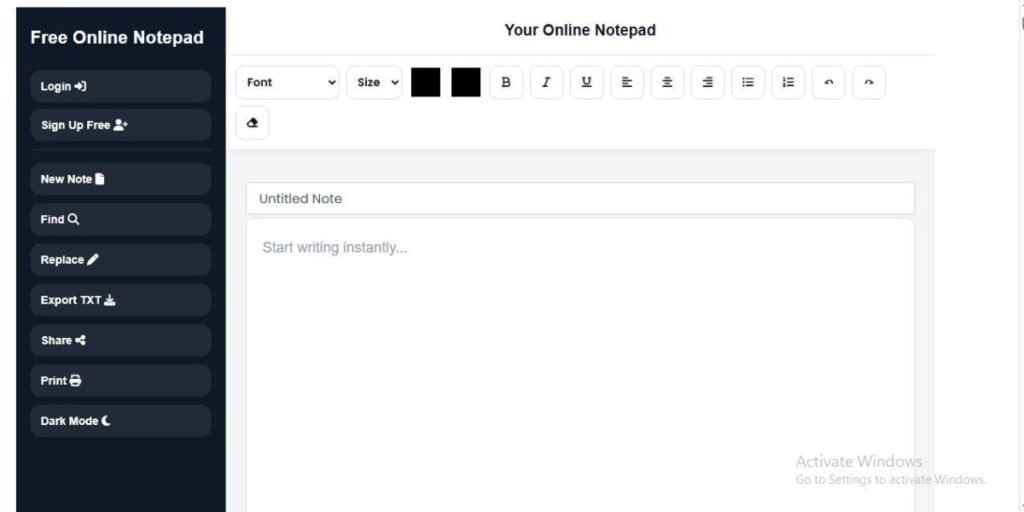
An online text editor is a browser-based tool that lets you write, edit, and format text without installing traditional desktop software.
Unlike a desktop application, an online text editor can usually be opened directly in a compatible web browser. Depending on the editor, it may include features such as rich text formatting, autosave, word and character counting, Find & Replace, and document export.
Online text editors can be useful for students, writers, professionals, researchers, and developers who need a convenient place to work with text.
In this guide, you will learn what an online text editor is, how it works, the main types and features, who can use one, and how to choose an editor for your needs.
In this guide, you’ll learn:
Table of Contents
Why Do People Use Online Text Editors?
People use online text editors for several practical reasons.
- They can be opened through a web browser.
- Many do not require traditional software installation.
- They can be used on different computers and mobile devices.
- Many provide useful writing and editing features.
- Some support automatic saving or online storage.
For someone who mainly needs to write or edit text, a browser-based editor can be a simple alternative to installing a larger desktop application.
How Does an Online Text Editor Work?
An online text editor runs inside your web browser and uses web technologies to display an editable writing area. When you type, the browser processes your text and updates the editor as you make changes.
Depending on the editor, your work may be stored in your browser, saved to an online account, or handled through another storage system.
A typical online text editor may provide features such as:
- Text editing
- Rich text formatting
- Undo and redo
- Find & Replace
- Keyboard shortcuts
- Automatic saving
- Word and character counting
- Export or download options
- Printing
The exact features and storage method depend on the editor you choose.
For example, an editor that uses browser storage may keep your notes on the device and browser where you created them. An editor that uses account-based storage may associate your saved documents with your account.
This is why it is important to understand both how the editor works and how it stores your work before using it for important documents.
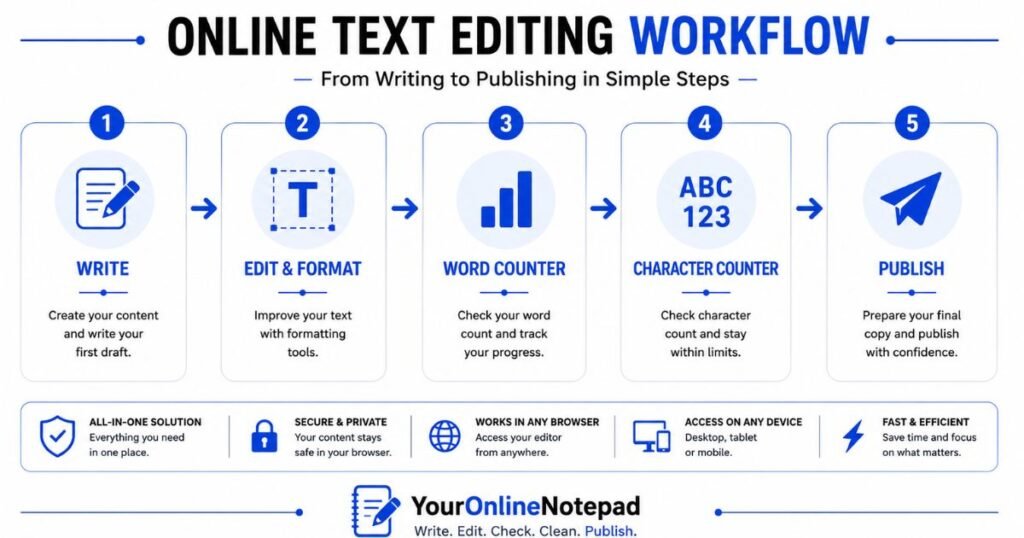
Although it appears simple on the surface, an online text editor combines several web technologies to create a responsive writing experience.
This connected workflow saves time and reduces the need to switch between multiple websites.
Types of Online Text Editors
Not all online editors serve the same purpose. Understanding the differences helps you choose the right tool for your workflow.
Plain Text Editors
Plain text editors focus solely on writing text without formatting.
They are commonly used for:
- coding
- configuration files
- quick notes
- scripts
- markdown
Since plain text removes fonts, colours, and styling, it ensures maximum compatibility across platforms.
Rich Text Editors
Rich text editors allow users to format documents visually.
Typical formatting features include:
- Bold
- Italic
- Underline
- Headings
- Lists
- Text colour
- Highlighting
- Alignment
- Hyperlinks
These editors are ideal for articles, reports, assignments, proposals, newsletters, and other documents that require professional formatting.
Markdown Editors
Markdown editors are popular among developers and technical writers.
Instead of clicking formatting buttons, users write simple Markdown syntax to create headings, lists, links, and emphasis.
Markdown combines speed with clean document structure, making it an excellent choice for documentation and technical content.
Collaborative Editors
Collaborative editors allow multiple people to work on the same document simultaneously.
These are commonly used by businesses, educational institutions, and remote teams that require real-time collaboration.
Key Features of an Online Text Editor
Different online text editors offer different features. The tools available can depend on the editor and the type of work you want to do.
Rich Text Formatting
Rich text formatting lets you change the appearance and structure of your content while you write.
Depending on the editor, you may be able to use:
- Headings
- Bold and italic text
- Underline
- Bulleted and numbered lists
- Text alignment
- Text colour
- Highlighting
- Hyperlinks
These features are useful when you need to create more structured and readable documents instead of working with plain text only.
Word and Character Counting
Some online text editors provide live writing statistics while you type.
A word count can help when an assignment, article, or other document has a required length. A character count can be useful when working with limits for titles, descriptions, social media posts, and other content.
Autosave
Some online text editors can save changes automatically while you work. This can reduce the risk of losing recent changes after an accidental refresh or other interruption.
However, autosave is not the same as a backup. The way your work is stored depends on the editor.
For a deeper explanation, read Autosave in Online Editors: How It Works and Why It Matters.
Find and Replace
Find and Replace helps you locate a word or phrase and replace it without searching through the entire document manually.
This can be useful when editing long documents, reports, articles, and technical content.
Export and Printing
Some online text editors let you download or export your work in supported file formats. Many also provide a print option.
Exporting your work can be useful when you want to keep a separate copy or continue editing it in another application.
The available formats depend on the editor.
The available formats depend on the editor.
Who Can Benefit from an Online Text Editor?
Online text editors can be useful for many types of users.
Students
Students can use them for assignments, lecture notes, essays, revision notes, and research drafts.
Writers
Writers, bloggers, and content creators can use online editors to draft articles, organise ideas, and edit their writing.
Professionals
Professionals can use them for meeting notes, reports, project notes, checklists, and email drafts.
Developers
Developers can use lightweight editors for code snippets, Markdown, configuration notes, and technical documentation.
Researchers
Researchers can use online editors to organise notes, observations, drafts, and other text-based research material.
Online Text Editor vs Desktop Text Editor
An online text editor runs in a web browser, while a desktop text editor is installed on your computer.
Online editors can be useful when you want quick access without installing traditional software. Desktop editors can be useful when you need advanced features, local file management, or a workflow that does not depend on a browser.
The better option depends on your writing needs, device, storage preferences, and the features you use most.
For a detailed comparison, read Online Text Editor vs Microsoft Word.
Online Text Editor vs Google Docs
Both online text editors and Google Docs allow users to work with text in a browser, but they can support different workflows.
A lightweight online text editor may focus mainly on writing and editing, while Google Docs is more strongly designed for document collaboration, sharing, comments, and other productivity features.
The right option depends on whether you need simple browser-based writing or a broader collaborative document environment.
For a detailed comparison, read Online Text Editor vs Google Docs.
How to Choose an Online Text Editor
Before choosing an online text editor, consider how you plan to use it.
Purpose
Think about what you need to write. A student, writer, developer, and business user may need different features.
Formatting
If you create formatted documents, look for features such as headings, lists, bold and italic text, links, and alignment.
Storage and Privacy
Check how the editor stores your work. It may use browser storage, an online account, cloud storage, or another method.
Autosave
Automatic saving can make everyday writing more convenient, but you should also understand where your saved work is stored.
Export Options
Exporting can be useful when you want to keep a separate copy or move your writing to another application.
Device Support
Check whether the editor works properly on the computers, tablets, and phones you use.
Ease of Use
A simple interface can make writing easier and reduce unnecessary distractions.
The best online text editor is the one that fits your actual writing workflow rather than the one with the largest number of features.
Common Uses of an Online Text Editor
One reason browser-based editors have become so popular is their versatility.
People use them every day for tasks such as:
Writing Blog Posts
Content creators often begin their first draft inside a distraction-free editor before publishing to a CMS.
After writing, they can:
- check Word Count
- estimate Reading Time
- remove unwanted formatting
before publishing.
Taking Notes
Students and professionals frequently use online editors to record:
- lecture notes
- meeting minutes
- brainstorming ideas
- research findings
Autosave helps ensure nothing is lost during long sessions.
Drafting Emails
Before sending important emails, many users prepare drafts in a text editor where they can review formatting, grammar, and structure.
Academic Writing
Students can prepare:
- essays
- reports
- assignments
- research papers
while monitoring the required word limit.
Content Marketing
SEO writers often combine several tools during their workflow:
- Draft the article in the Online Text Editor.
- Check length with the Word Counter.
- Verify title and meta description limits using the Character Counter.
- Estimate engagement with the Reading Time Calculator.
- Remove copied formatting using the Text Cleaner before publishing.
This integrated workflow saves time and improves consistency.
Why YourOnlineNotepad Is Different
YourOnlineNotepad is designed for users who want more than a basic text box but do not need a full office suite for every writing task.
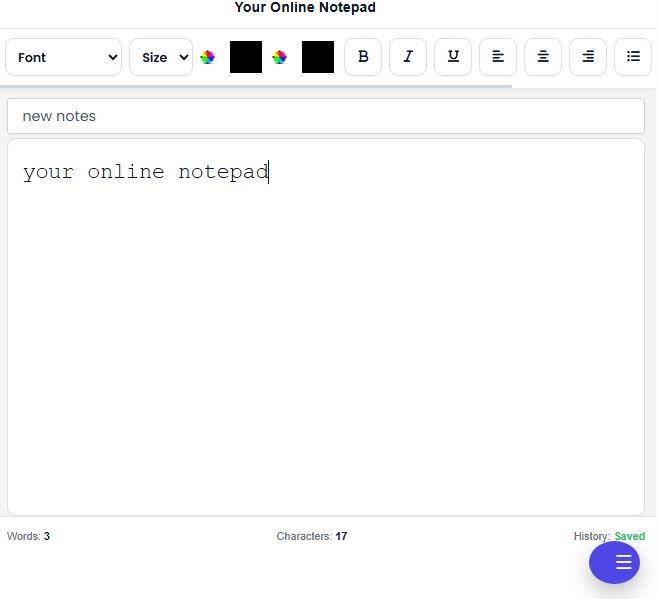
You can start writing directly in your browser and use common editing features such as rich text formatting, automatic saving, Find & Replace, word and character counting, TXT export, printing, dark mode, and optional note history.
The goal is to keep common writing tasks in one workspace so you can draft, edit, check, and prepare your text without constantly moving between different websites.
For example, you can write a draft, check its length, adjust its formatting, and export the finished text from the same writing environment.
If you want to learn more about how browser-based writing works, see our guide to Writing Without Installing Software.
Can an Online Text Editor Work Offline?
Some browser-based text editors can continue working without an internet connection, but offline support depends on how the editor is built.
Some editors use browser storage, cached files, or other offline technologies to keep certain content available without a connection. However, features such as cloud synchronization, collaboration, and account-based services may still require internet access.
Before relying on an online editor for offline work, check which features are actually available without an internet connection.
Is Offline Editing the Same as Automatic Saving?
No. Automatic saving and offline editing are related but different features.
Automatic saving means the editor saves your work automatically instead of requiring you to press a Save button repeatedly.
Offline editing means the editor can continue functioning when your internet connection is unavailable.
An editor can automatically save your text locally without providing complete offline functionality. Therefore, users should check the editor’s actual offline support rather than assuming that automatic saving means the editor works offline.
Can an Online Text Editor Work Offline?
Some browser-based text editors can continue working without an internet connection, but offline support depends on how the editor is built.
Some editors use browser storage, cached files, or other offline technologies to keep certain content available without a connection. However, features such as cloud synchronization, collaboration, and account-based services may still require internet access.
Before relying on an online editor for offline work, check which features are actually available without an internet connection.
Frequently Asked Questions About Online Text Editors
What is an online text editor?
An online text editor is a browser-based tool that lets you write, edit, and format text without installing traditional desktop software.
How does an online text editor work?
An online text editor runs in your web browser and uses web technologies to provide an editable writing area. Depending on the editor, your work may be stored locally in the browser or connected to an online account.
Is an online text editor free?
Some online text editors are free, while others offer free and paid plans. Features vary between services.
Is an online text editor safe to use?
Safety depends on the editor and how it stores and handles your data. Before using one for important information, check its privacy and storage practices.
Can I use an online text editor without downloading software?
Yes. An online text editor can usually be opened directly in a compatible web browser without installing a traditional desktop program.
Does an online text editor work offline?
Some do, but offline support depends on the specific editor. Check which features remain available when there is no internet connection.
Can I export my documents?
Many online text editors provide download or export options, but the available file formats depend on the editor.
Does an online text editor count words and characters?
Some editors include built-in word and character counting so you can monitor your text while writing.
Who should use an online text editor?
Online text editors can be useful for students, writers, professionals, researchers, developers, and anyone who needs a convenient browser-based place to work with text.
What is the difference between an online text editor and a desktop text editor?
An online text editor runs in a web browser, while a desktop text editor is installed on a computer. Each option can be useful depending on the user’s workflow and feature requirements.
Conclusion
An online text editor is a browser-based tool for writing, editing, and formatting text without relying on traditional desktop software.
Different editors provide different features, from simple text editing to rich formatting, autosave, word and character counting, Find & Replace, export, and printing.
The right editor depends on what you need to write, how your work is stored, which devices you use, and which features are important to your workflow.
YourOnlineNotepad is designed for everyday browser-based writing, with common editing and text-management features available in one workspace.
For more specific topics, explore our guides on Autosave in Online Editors, Writing Without Installing Software, Plain Text vs Rich Text, and Online Text Editor vs Microsoft Word.
Pingback: Plain Text Vs Rich Text: What’s The Difference?
Pingback: Best Free Text Editor Online: How To Choose The Right One