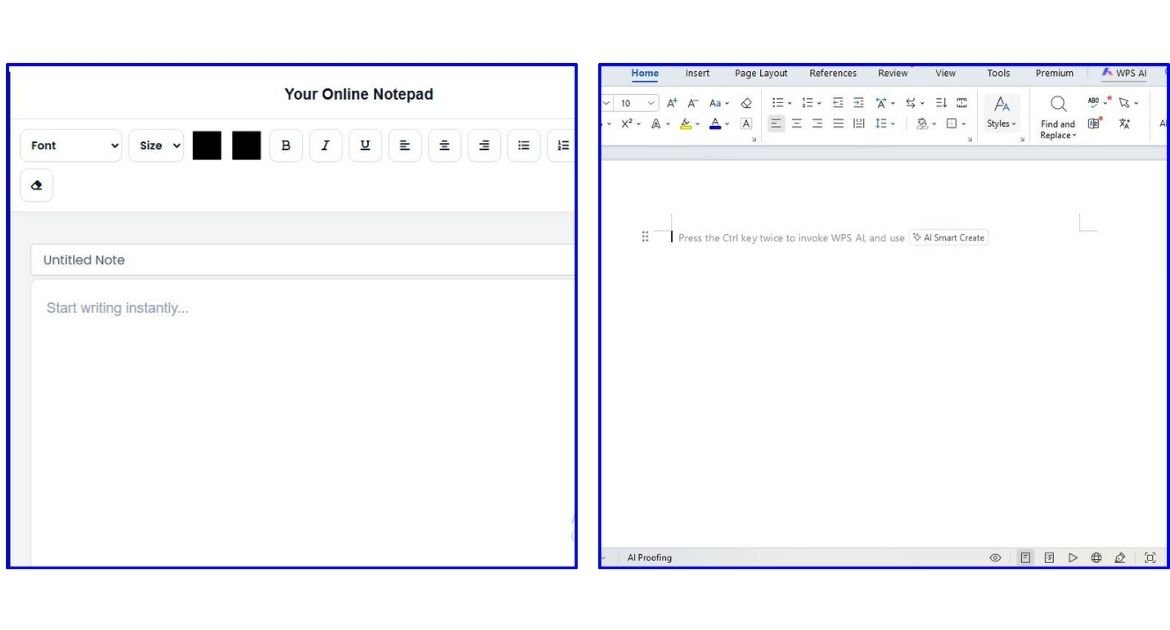
Writing a document does not always require a large word processor. Sometimes you only need a simple place to type, edit, and save your work.
An online text editor lets you write directly in your web browser. Microsoft Word is a full word-processing program designed for everything from simple documents to complex reports and professional files.
Both tools can be useful. The better choice depends on what you need to do.
In this guide, we will compare an online text editor with Microsoft Word and explain which option is better for different types of writing.
What Is an Online Text Editor?
Table of Contents
What Is an Online Text Editor?
An online text editor is a browser-based tool that lets you write and edit text without installing desktop software.
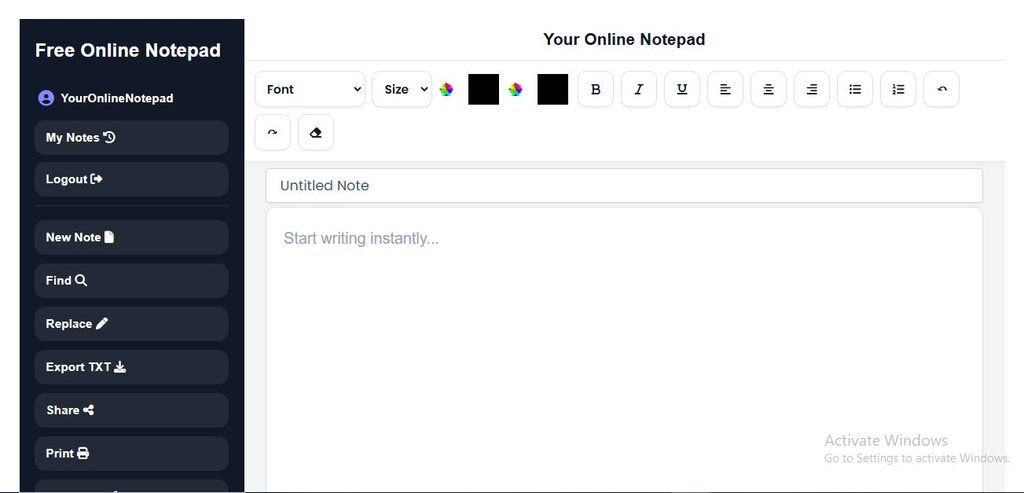
You can open the editor in a web browser and start writing immediately. Depending on the tool, you may also get features such as rich text formatting, word counting, character counting, autosave, find and replace, printing, and file export.
An online text editor is useful when you want a quick and simple writing workspace without the extra features of a full word processor.
For example, you can use the Online Text Editor on YourOnlineNotepad to write notes, drafts, blog ideas, assignments, emails, and other text.
What Is Microsoft Word?
Microsoft Word is a full-featured word processor from Microsoft.
It is designed for creating and managing many types of documents, including:
- Reports
- Essays
- Resumes
- Business documents
- Research papers
- Letters
- Books
- Professional documents
Microsoft Word provides many advanced tools for formatting, reviewing, inserting objects, creating tables, managing references, and working with other people. Word for the web also supports browser-based editing and collaboration.
This makes Word a strong choice when you need more than basic text editing.
Online Text Editor vs Microsoft Word
The biggest difference is simplicity versus advanced document features.
An online text editor is usually better for quick writing, notes, simple drafts, and distraction-free work.
Microsoft Word is better when you need advanced formatting, complex page layouts, professional document tools, or extensive document management.
Neither option is best for everyone.
Online Text Editor vs Microsoft Word: Comparison Table
| Feature | Online Text Editor | Microsoft Word |
|---|---|---|
| Browser access | Yes | Yes with Word for the web |
| Installation | Usually not required | Desktop version requires installation |
| Quick note-taking | Excellent | Good |
| Rich text formatting | Depends on editor | Yes |
| Word count | Often available | Yes |
| Character count | Depends on editor | Available |
| Autosave | Depends on editor | Yes |
| Advanced formatting | Limited to moderate | Extensive |
| Templates | Usually limited | Yes |
| Tables | Depends on editor | Yes |
| Images | Depends on editor | Yes |
| Collaboration | Depends on editor | Yes |
| Track Changes | Usually no | Yes |
| Advanced references | Usually no | Yes |
| Macros | Usually no | Desktop Word supports them |
| Best for simple writing | Yes | Not always necessary |
| Best for complex documents | Limited | Yes |
Ease of Use
Online Text Editor
Online text editors are often designed to be simple.
You open the page, click inside the editor, and start writing.
There are usually fewer menus and settings, which can make the writing area easier to understand.
This is useful when you do not need advanced document tools.
Microsoft Word
Word has many more tools and settings.
You can control fonts, styles, page layouts, tables, images, references, headers, footers, and many other parts of a document.
These features are useful for complex documents, but they can also make Word feel more complicated for simple writing.
Winner for simplicity: Online Text Editor
Winner for advanced document control: Microsoft Word
Installation and Access
One of the biggest benefits of an online text editor is that you can use it directly in your browser.
You do not normally need to install a desktop program.
This makes browser-based editors useful when you are working on a shared computer, a school computer, or a device where you do not want to install software.
Microsoft Word also has a web version that works in a browser. Microsoft says Word for the web lets users create and edit documents online and save them through Microsoft’s online storage services.
However, the desktop version of Word requires installation.
Winner for simple browser access: Online Text Editor
Formatting
Both tools can support text formatting, but Word offers much more control.
An online text editor may provide:
- Bold
- Italic
- Underline
- Headings
- Lists
- Text alignment
- Text colour
- Highlighting
- Links
Microsoft Word includes these basic options plus many advanced formatting and page-layout features. Microsoft lists tools such as styles, margins, page numbers, tables, pictures, headers, footers, and other document controls.
Winner for simple formatting: Online Text Editor
Winner for advanced formatting: Microsoft Word
Word and Character Counting
Writers often need to check how long their content is.
An online text editor may include a built-in word and character counter. This is useful for:
- Essays
- Blog posts
- Social media posts
- SEO content
- Assignments
- Short notes
Microsoft Word also provides word count. Word for the web displays word count while you work, and Microsoft also provides additional document statistics.
If you need deeper writing analysis, you can also use a dedicated Word Counter or Character Counter.
Autosave and Storage
Autosave can help protect your work from accidental loss.
Many online editors use browser storage or cloud storage, depending on how the tool is designed.
For example, some browser-based notepads save notes locally on the device. Others use accounts and cloud storage to make documents available across devices.
Microsoft Word for the web uses online storage such as OneDrive and supports autosave and version history.
This means you should always check where your content is stored before choosing a writing tool.
File Export
Microsoft Word is especially strong when you need to work with different document formats.
Word supports common document workflows and can export documents as PDF.
A simple online text editor may focus on formats such as:
- TXT
- HTML
The exact options depend on the editor.
If you only need to save simple text, a lightweight editor may be enough.
If you need complex Word documents, Microsoft Word is the stronger option.
Collaboration
Collaboration is another major difference.
Microsoft Word supports real-time co-authoring, comments, sharing, and version history in its web experience.
Some online text editors also support sharing or collaboration, but this depends on the specific tool. Not every online editor includes these features.
Winner for advanced collaboration: Microsoft Word
Advanced Features
This is where Microsoft Word has a clear advantage.
Word provides tools for:
- Tables
- Images
- Page numbers
- References
- Footnotes
- Comments
- Track Changes
- Templates
- Collaboration
- Advanced page layouts
- Mail merge
- Macros in desktop Word
Microsoft’s feature documentation shows that some advanced features are available only in desktop Word, while Word for the web provides a smaller set of capabilities.
A simple online text editor usually does not try to compete with all of these features.
And that is okay.
Its strength is keeping writing simple.
Which Is Better for Students?
It depends on the assignment.
Choose an online text editor when:
- You need to write a quick assignment draft.
- You want to count words.
- You want a simple writing space.
- You do not need complex formatting.
- You want to start writing quickly.
Choose Microsoft Word when:
- Your assignment needs complex formatting.
- You need citations or references.
- You need tables or images.
- You need page numbers.
- Your teacher requires a Word document.
For simple drafting, an online text editor can be faster.
For final academic documents, Microsoft Word may be the better choice.
Which Is Better for Writers?
For bloggers, copywriters, and content creators, an online text editor can be a very useful drafting tool.
You can focus on the words without dealing with unnecessary document settings.
A simple workflow could be:
Draft → Check Word Count → Check Characters → Clean Formatting → Publish
YourOnlineNotepad also connects this workflow with tools such as the Word Counter, Character Counter, Reading Time Calculator, and Text Cleaner.
Microsoft Word is a better choice when your writing needs advanced document formatting or professional file layouts.
Which Is Better for Quick Notes?
For quick notes, an online text editor is usually the simpler choice.
You do not need to create a complex document just to write down an idea.
You can open the editor, type your note, and continue with your work.
This makes browser-based editors useful for:
- To-do lists
- Meeting notes
- Ideas
- Reminders
- Research notes
- Quick drafts
- Temporary text
Winner: Online Text Editor
Which Is Better for Professional Documents?
For professional documents that need advanced formatting, Microsoft Word has the advantage.
It supports features such as:
- Professional templates
- Tables
- Images
- Headers and footers
- Page numbers
- References
- Comments
- Track Changes
- Advanced formatting
These tools are useful for reports, contracts, business documents, and other structured files.
For a simple business note or draft, however, an online text editor may still be faster.
Which Is Better for Developers?
Developers often do not need a full word processor for simple text.
An online text editor can be useful for:
- Code snippets
- Configuration notes
- Documentation drafts
- Markdown
- Quick technical notes
For full software development, however, a dedicated code editor or IDE is usually a better choice.
Microsoft Word is generally designed for documents rather than code.
Winner for quick technical notes: Online Text Editor
When Should You Use an Online Text Editor?
An online text editor is a good choice when you want:
- Fast access
- Simple writing
- No desktop installation
- A distraction-free workspace
- Quick notes
- Basic formatting
- Word counting
- Character counting
- Autosave
- Simple document export
It is especially useful when your main goal is writing rather than designing a complex document.
When Should You Use Microsoft Word?
Microsoft Word is a better choice when you need:
- Complex document formatting
- Professional templates
- Advanced page layouts
- Tables and images
- References and citations
- Track Changes
- Comments
- Collaboration
- Advanced document management
- Complex Word files
Word is built for users who need a complete word-processing system.
Can an Online Text Editor Replace Microsoft Word?
For some users, yes. For everyone, no.
If you mainly write notes, drafts, blog posts, simple documents, or short assignments, an online text editor may provide everything you need.
But if you create complex reports, research papers, professional documents, or files that require advanced formatting, Microsoft Word is still a stronger choice.
The goal is not to replace every feature of Word.
The goal is to use the right tool for the job.
Online Text Editor vs Microsoft Word: Which One Should You Choose?
Use this simple guide:
| Your Need | Better Choice |
|---|---|
| Quick notes | Online Text Editor |
| Simple drafts | Online Text Editor |
| Distraction-free writing | Online Text Editor |
| Basic text formatting | Online Text Editor |
| Word counting | Either |
| Character counting | Depends on the editor |
| Complex reports | Microsoft Word |
| Research papers | Microsoft Word |
| Advanced page layouts | Microsoft Word |
| Professional templates | Microsoft Word |
| Track Changes | Microsoft Word |
| Advanced collaboration | Microsoft Word |
| Complex document formatting | Microsoft Word |
The simple answer:
Choose an online text editor when you want speed and simplicity.
Choose Microsoft Word when you need advanced document features.
Why Use YourOnlineNotepad for Simple Writing?
YourOnlineNotepad is designed for people who want to start writing without dealing with a complicated word processor.
You can use the Online Text Editor to write and edit text directly in your browser.
You can also use related tools on the site:
- Word Counter — check your word count.
- Character Counter — check character limits.
- Reading Time Calculator — estimate reading time.
- Text Cleaner — remove unwanted formatting.
This makes YourOnlineNotepad useful for a simple workflow from drafting to final text.
Frequently Asked Questions
Is an online text editor better than Microsoft Word?
Not for everyone. An online text editor is better for quick and simple writing, while Microsoft Word is better for complex documents and advanced formatting.
Can I use an online text editor instead of Word?
Yes, if you only need basic writing, editing, formatting, and simple document tools. For advanced documents, Word may be a better choice.
Is Microsoft Word available online?
Yes. Microsoft offers Word for the web, which lets users create and edit documents in a browser.
Is an online text editor free?
Many online text editors are free. However, features vary between tools.
Which is better for students?
An online text editor is useful for quick notes and drafts. Microsoft Word may be better for final assignments that require advanced formatting, references, or specific Word file formats.
Which is better for writers?
An online text editor is often better for distraction-free drafting. Microsoft Word is useful when writers need advanced formatting and document management.
Does Microsoft Word have a word counter?
Yes. Microsoft Word provides word counting in both desktop Word and Word for the web.
Can I collaborate in Microsoft Word?
Yes. Word for the web supports real-time co-authoring, comments, sharing, and version history.
Can an online text editor save my work automatically?
Many can, but the storage method depends on the editor. Some use browser storage, while others use cloud accounts.
Conclusion
An online text editor and Microsoft Word are designed for different needs.
An online text editor is a good choice when you want to write quickly, keep things simple, and work directly in your browser.
Microsoft Word is better when you need advanced formatting, professional layouts, collaboration, references, and other powerful document features.
You do not always need the most powerful tool. Sometimes, a simple writing space is all you need.
If your goal is to write, edit, count, clean, and prepare text quickly, try the Online Text Editor on YourOnlineNotepad. Then use the Word Counter, Character Counter, Reading Time Calculator, and Text Cleaner to finish your content without switching between different websites.
Pingback: Plain Text Vs Rich Text: What’s The Difference?
Pingback: Best Free Text Editor Online: How To Choose The Right One